
PDF imposition is the step between a finished document and a printable book. Software rearranges the PDF's pages onto printing sheets so that, once printed on both sides and folded, they read in order. The file you wrote runs 1, 2, 3, 4. The sheets carry those pages scrambled, because the fold decides which pages share a sheet.
The word ambushes you. One day you decide to print a zine, or bind a fanfic, or turn a manuscript into a proof copy, and every tutorial keeps saying it: impose the pages, use an imposition tool, check the imposition before you print. Nobody stops to define it. It's a printer's word with centuries of trade history behind it, and the job it names hasn't changed since metal type. This is the beginner's tour: what the word means, where it came from, why the shuffle differs from binding to binding, and how much of it you actually have to learn.
What does imposition mean in printing?
Imposition is the arranging of a document's pages on printing sheets so that after the sheets are printed, folded, and bound, the pages read in the correct order. A PDF stores pages one after another, the way you read them. A printed book is built from folded sheets that each carry several pages, and the fold decides which pages share a sheet. Imposition works that placement out ahead of time, so the printed stack folds into a book instead of a shuffle.
Folio does this arithmetic in your browser. Drop in a PDF and watch the page order change with the binding you pick.
The smallest case shows the whole idea. Fold one sheet in half and it becomes four pages. For those pages to read 1, 2, 3, 4 after the fold, the flat sheet has to carry them scrambled: pages 3 and 2 on the front, pages 4 and 1 on the back.
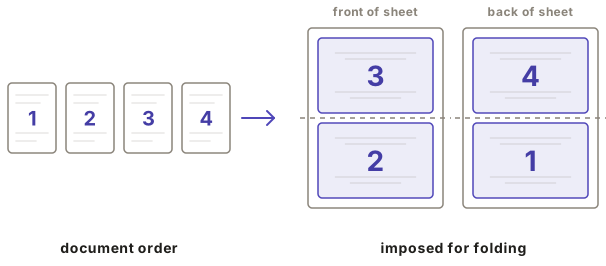
Page 1 and page 4 are neighbors on paper and three pages apart in the story. That gap only widens as books grow. PDF imposition means running this rearrangement on a PDF file: software reads your document and writes a new PDF whose pages sit where the folds need them. If you want to try the four-page version with real paper, how to print a PDF as a book walks through it sheet by sheet.
Where does the word imposition come from?
From letterpress, where it named a physical act. A compositor assembled each page out of individual pieces of metal type, then laid the finished pages into a frame in a deliberately scrambled arrangement and locked them in place for the press. Placing the pages in the frame was called imposing. Get it right and the printed sheet folded into a readable section. Get it wrong and the whole print run folded into nonsense.
Folding is also where book sizes got their names. A sheet folded once made a folio, four pages. Folded again, a quarto, eight. A third fold made an octavo, sixteen pages from one sheet. Binders received the sheets flat and folded them by hand, following the printed page numbers to check the work. James Nicholson's 1856 bookbinding manual walks the binder through folding an octavo sheet whose flat face reads 2, 15, 14, 3 across one row, with 7, 10, 11, 6 printed upside-down above them. That is the level of scrambling a working binder navigated daily, and it explains a word bookbinders still use. Printers set a letter at the foot of each folded sheet's first page, running a, b, c through the book, so the bindery could keep the sheets in order. The letter was called the signature, and the name rubbed off onto the folded sheet itself. When binders today sew signatures, they're using the name of the printing trade's oldest page-order checksum.
The reason all of this exists is press economics. A press prints a full sheet in one pass, and paper is made, sold, and handled in large sheets, so pages have always been printed several to a sheet and folded down to size. Imposition is the tax that folding collects.
How does imposition change with the binding?
The same PDF imposes differently for each way you plan to bind it. A single folded booklet nests every sheet inside one fold, so the outermost sheet pairs the first pages with the last. A sewn book splits into signatures, and the pairing resets with each section. A glued book stacks its sheets one behind another, so each sheet simply carries four consecutive pages. Imposition is not one fixed shuffle. It is computed from the binding you choose.
Take an eight-page zine bound as one folded section. Its two sheets nest, so the outer sheet carries pages 8 and 1 back to back with 7 and 2, while the inner sheet holds the middle of the story. A hundred-page sewn book works differently: it's built as a series of signatures, each one a modest folded section, and every signature is imposed as its own small booklet before the sections are sewn together in sequence. And a glued-spine book, the structure of most paperbacks, doesn't nest at all. Its sheets are gathered in a stack, the spine is glued, and the imposition just deals four pages onto each sheet in order.
The old trade rule behind this still holds: page layout is decided at the desk, but it answers to the bindery. A layout that ignores how the book will be folded, gathered, and finished produces sheets that fold into the wrong book. That's also why the "booklet" checkbox in a print dialog only covers the first case. It knows one trick, the single nested section, and it applies that trick whether or not your project is one.
What is a pre-imposed booklet?
A pre-imposed booklet is a PDF whose pages are already arranged in printing order, two to a side, so each sheet folds into the right sequence. You print it double-sided at actual size with the print dialog's booklet option turned off. Folio's export is a pre-imposed booklet. A normal PDF, in reading order, is not.
What else does imposition handle besides page order?
Real imposition also pads the page count with blanks so the last fold comes out complete, reserves extra margin at the spine so text does not vanish into the fold, and compensates for creep, the way nested pages push outward as paper thickness stacks up. Page order is the visible part of the job. These corrections are what make the folded book usable.
Each one earns its keep. A folded sheet carries four pages, so a 30-page PDF can't fill its sheets evenly. An imposition tool adds two blanks rather than leaving half a sheet ragged. The spine margin exists because the fold physically consumes paper, and a line of text that looked comfortable on screen can sit in the crease after binding. Creep is subtler: nest several sheets into one thick section and the inner pages stick out past the outer ones at the open edge, so trimming the book flush shaves the outer margins of the innermost pages narrower. Printers call the fix shingling, nudging each page toward the spine by an amount that depends on its position in the section. Folio pads the blanks automatically, reserves the spine margin from your binding settings, and compensates for creep once you give it your paper thickness in Expert Layout. It can also draw fold lines and sewing-station ticks on the printed sheet, and re-stamp page numbers so they land right side up after folding, which page numbering in bookbinding covers on its own.
Do I need to do imposition by hand?
No. Imposition was once a trade skill in its own right, and a mistake ruined every copy of the sheet, but the arithmetic is exactly what software is for. What you still decide is everything the arithmetic depends on: which binding you want, what paper you'll print on, and how many sheets fold together into a section. Answer those and the tool places every page.
Plenty of tools run this arithmetic, and free PDF imposition tools compared puts the usual candidates side by side. Folio does the whole job in your browser. Your PDF never uploads anywhere. The file is read and rebuilt on your own machine, and you download print-ready sheets. Print & Fold imposes a single-section booklet, the zine and chapbook shape. Guided Binder handles the longer structures, sewn signatures or a glued spine, and walks you through the binding afterward. Pick whichever matches the object you're imagining, fold a booklet in Print & Fold or build a book in Guided Binder, and watch the preview: the scrambled sheet order that took this many words to explain is laid out there in front of you.