
You finished the thing. The novel, the comic, the campaign setting, the poems you've been editing for a year. It lives as a file. A file isn't a book, and a stack of single-sided pages off the office printer isn't one either. It's loose paper with no spine. Binding is the step that turns the work into an object you can shelve, lend, or hand to someone. Folio handles the part in the middle: it takes your PDF and arranges the pages so that when you print, fold, and sew them, they come out as a real book in the right reading order.
How do I turn my creative work into a book?
Get your work into a single PDF, then let Folio rearrange the pages into folded sections that print on a home printer and fold or sew into a book. Folio runs entirely in your browser and only ever hands you a PDF to print, so your manuscript never leaves your computer.
The on-ramp is the same wherever the work comes from. Export your draft to PDF from Scrivener, Word, Google Docs, or InDesign. Save a comic out of your art program as a PDF. Download a fic from an archive as a PDF, or open the one you exported from your own manuscript. Turning an AO3 fic into a real book walks the fic path end to end. Once it's a single PDF, Folio treats all of it the same way. For the full path from a PDF to a printed, bound book, start with How to print a PDF as a book.
Most of the time you're binding a copy for your own shelf, which is the everyday, personal use this is built for. If the words are someone else's, keep it personal: don't sell what isn't yours, and respect any author who's asked that their work not be printed.
What kinds of writing and art can I bind?
Almost anything that exists as a PDF: a novel or manuscript, a comic or graphic short, a poetry collection, a tabletop RPG rulebook, or a fic you want off the screen and onto a shelf. Binding doesn't care what the words are. It cares about the page count and the page size.
What changes from one kind of work to the next is the page count and how much the layout crowds the spine:
- A novel or manuscript is mostly text and usually long, so it wants several signatures sewn together rather than one thick fold.
- A comic or graphic novel lives on page size and bleed. Print it at the size you drew it, and leave room at the spine so art near the gutter doesn't vanish into the fold.
- A poetry collection or chapbook is often short enough to fold as a single section.
- Tabletop RPG material (rulebooks, adventures, a homebrew setting) runs long and reference-heavy, so clean page numbers matter for finding things at the table.
- A fic you've been meaning to own in print downloads as a PDF and binds like any other manuscript.
Should I print a single booklet or sew several signatures?
Print a single folded booklet for something thin, like a short story or a chapbook, and switch to several sewn signatures once the work is too thick to fold as one piece. A single section can only take so many sheets before the fold turns bulky and the inner pages start to splay.
Folio gives each path its own mode. Print & Fold imposes your pages as one folded section: print, fold, staple at the spine if you want, done. It's the right tool for anything thin, and it's the same mode you'd reach for to make a zine at home. Guided Binder is for everything longer. It splits the book into several signatures and walks you through printing each one, folding it, and sewing the stack together into one text block. How many sheets each signature should hold is its own question, and the signature size guide answers it.
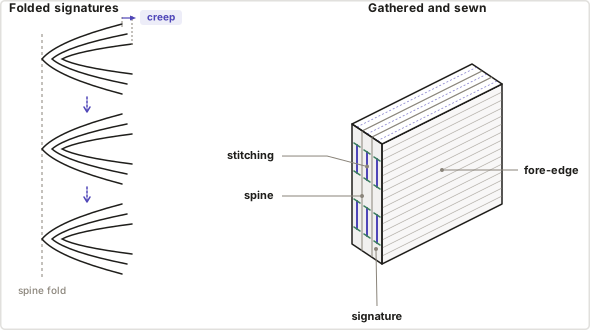
Each folded bundle of sheets is a signature. You gather several, line their spines up, and sew through the folds to hold them together. The diagram also shows creep: in a thick signature the inner leaves push out past the outer ones at the fore-edge, which is the next thing to handle.
How do I keep page numbers and creep under control in a long book?
A long work brings two problems a short one doesn't: imposition scatters the original page numbers onto the wrong edges, and thick folded sections push their inner pages outward so they lose content at the trim. Folio detects and re-stamps the numbers and shifts the inner pages back toward the spine, so the finished book reads in order and trims clean.
Page numbers come first. Your original PDF numbers its pages to read straight through, but imposition tears that order apart and reassembles it into folded signatures, so the old numbers can land in the gutter, hang off the fore-edge, or print upside-down on the backs. Folio reads the existing numbers, removes them, and stamps fresh ones that read correctly after the fold. The full mechanism is in Page numbering in bookbinding.
Creep is the other. Fold several sheets together and the paper's own thickness shoves the inner pages outward at the fore-edge, so trimming the stack flush costs the inner pages more of their margin than the outer ones. Turn on creep compensation and enter your paper thickness, and Folio shifts each inner page back toward the spine to cancel the push. It only bites on thick signatures. A thin single section barely creeps at all.
Both of those assume the print itself lands true: actual size, backs aligned to fronts. If your output comes out shrunk or the backs don't line up at the fold, that's a printer-settings problem, and calibration and printing walks through fixing it.
What this means in practice
A bound book is hard to take apart and redo, so the work that counts happens before you fold a single sheet. Pick the structure that fits the length, clean up the numbering, and compensate for paper thickness while it's all still a PDF. Get those right and the physical part is mostly folding, sewing, and trimming.
Start a multi-section book in Folio's Guided Binder and turn your PDF into signatures you can fold and sew.