
A zine is the easiest thing to make and one of the easiest things to print wrong. You lay out eight or sixteen pages that read straight through on screen, send them to the printer double-sided, and the folded result has its spreads in the wrong order with half the backs upside-down. The layout isn't the problem. It's imposition. For a folded booklet the pages have to be shuffled and rotated so they only fall into reading order after the sheet is folded in half, which means a zine never prints in plain 1, 2, 3 order. Get the page order and a couple of print settings right, though, and a home printer and a stapler really are all you need.
How do I print a zine at home?
Lay your pages out in saddle-stitch order, print them double-sided onto one or more sheets, fold the stack in half, and staple along the fold. The only fiddly part is the page order, and that is exactly what Folio's Print & Fold mode works out for you: you give it your PDF and a paper size, it arranges the pages so they read correctly once folded, and you print and fold the result.
Saddle stitch is the binding under most thin zines, chapbooks, and pamphlets. It's a single section, which means every sheet is folded together down one spine, so the whole zine is one folded stack rather than several gathered bundles. Folio runs entirely in your browser and hands back a print-ready PDF to download, so your pages never leave your machine. If you're binding something thicker than a zine, the same imposition idea scales up. How to Print a PDF as a Book covers the broader picture.
How many pages does a saddle-stitch zine need?
A saddle-stitch zine has to be a multiple of four pages: 4, 8, 12, 16, and up. Each sheet you fold in half carries four pages, two on the front and two on the back, so pages come in fours and you can't add just one. If your content doesn't land on a multiple of four, you either add pages or let some run blank.
One folded sheet is four pages. Nest a second sheet inside it and you have eight, a third makes twelve, and so on. Folio handles the count for you: if the PDF you load isn't a multiple of four, it pads the section out with blank pages to fill the last sheet, so you don't do the arithmetic. You can also leave blanks on purpose, say to start your first piece on a right-hand page. Numbering a zine after it's imposed has its own quirks, since a number that sat at the bottom-center on screen can land near the fold or upside-down once the sheet is folded. Page Numbering in Bookbinding covers how Folio places numbers so they read right after the fold.
What paper should I use for a zine?
Standard text-weight printer paper, somewhere around 80 to 100 gsm, is the safe default: light enough to fold flat and staple through cleanly, heavy enough that the pages don't feel limp. Keep heavier card stock for a cover, if you want one at all. Very thick paper fights the fold and chokes a stapler once a few sheets are nested together.
The thing to watch with paper is what happens as you nest more sheets. The inner pages push outward past the outer ones at the open edge, because the fold has to wrap around the thickness of everything tucked inside it. Binders call this creep. On a thin zine of a few sheets it's a fraction of a millimeter and you'll never see it. On a fat one it's enough to eat into your margins when you trim the fore-edge flush. If your zine is creeping toward book thickness, that's the point to think about sewn signatures instead of one stapled section. How to Bind Your Creation covers longer works and the creep that comes with them.
How do I fold and staple a saddle-stitch zine?
Fold the printed stack in half along the center, crease it firmly, and put two staples on the fold line: one in the upper third, one in the lower third. Those two staples through the spine are the stitch in saddle stitch. A normal desk stapler reaches the fold of a small zine. For a full folded sheet you'll want a long-reach or saddle stapler that can get to the center.
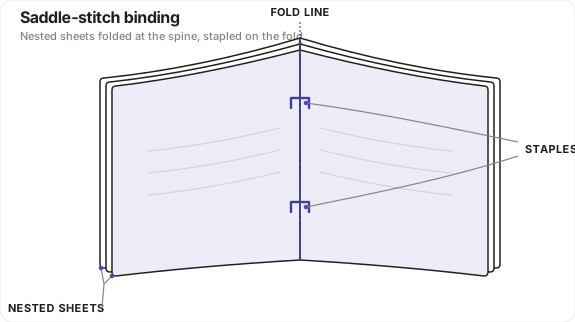
Crease matters more than people expect. Fold all the sheets together as one stack so the spine is a single clean crease, and run a bone folder or the back of a ruler along it so the booklet lies flat instead of springing open. Then staple from the outside of the spine through to the center, or open the stack flat over the edge of a table and drive the staples down through the fold. Space them evenly and keep them clear of the very top and bottom edges. If the open fore-edge looks ragged once it's folded, trim it flush with a craft knife and a steel rule. The spine stays untouched.
What's the difference between a one-sheet mini-zine and a saddle-stitch zine?
A mini-zine is a single sheet folded into eight small pages with one cut and no staples. A saddle-stitch zine is one or more full sheets folded in half and stapled at the spine. The mini-zine is the fastest zine there is and needs no binding at all. Saddle stitch is what you reach for once you want full-size pages, proper double-sided spreads, and more than eight pages.
The classic eight-page mini-zine is printed on one side of one sheet, folded into eighths, slit once down the middle, and collapsed into a tiny booklet. It's a one-sided hand fold with its own layout, and it never gets stapled, so it's a different job from the one Folio does. Print & Fold imposes the saddle-stitch kind: double-sided sheets, folded and stapled, scaling from a single folded sheet for a four-page zine up through nested sheets for eight, twelve, or sixteen. So if you want the cut-and-fold mini-zine, reach for the hand technique. If you want anything with a stapled spine, that's saddle stitch, and Print & Fold lays out the pages for it.
How do I keep my zine's pages lined up when I print?
Print at actual size with scaling switched off, and print from a real PDF viewer rather than your browser. A "fit to page" or "shrink to fit" setting scales the whole sheet down by a few percent, which is enough to pull the front out of register with the back so the fold stops splitting the spreads evenly. Actual size keeps every measured distance true, front and back.
Folio writes PrintScaling: None into the PDF's viewer preferences, which tells a conforming reader to default its print dialog to actual size. It's a sensible default, not a lock, and the browser ignores it entirely, which is why you open the file in Preview, Acrobat, or Document Viewer instead of printing from a browser tab. To prove the page is coming out true to size, and to get the back of each sheet to land squarely behind the front so the fold splits the pages cleanly, print Folio's calibration sheet first and measure it. Calibration & Printing walks through the actual-size, duplex, and fold-alignment settings step by step.
None of this takes special gear. Once the page order and the scaling are sorted, a zine is a print, a fold, and a couple of staples. Lay out your zine in Folio's Print & Fold mode and it'll impose the pages so they read in order the moment you fold the sheet.