
The fic is 180,000 words, you've read it three times, and it lives in a browser tab. Fanbinding, the corner of fandom that turns fanfiction into hand-bound books, fixes that: download the work, print it, fold it, sew it, shelve it. None of those steps needs a print shop, and most are exactly as direct as they sound. The exception hides in the middle. A book's pages don't print in reading order, the AO3 download doesn't know that, and discovering it after you've printed 300 pages is the expensive way to learn. This is the whole path from download to bound book, with that step handled.
How do I turn a fanfic into a printed book?
Download the fic as a single PDF, run it through an imposition tool that rearranges the pages into folded sections, print those sheets double-sided on a home printer, then fold and bind them. The layout is the only step that needs software. Folio does it in the browser, and the fic never leaves your computer.
The same pipeline covers a 2,000-word oneshot and a series that outran its trilogy. In Folio the run looks like this:
- Get the fic as a single PDF: AO3's Download button with PDF picked, or your own export from a word processor.
- Open the PDF in Folio. It reads the page count and page size in your browser. Nothing uploads.
- Pick a mode: Print & Fold for a oneshot booklet, Guided Binder for a longfic in sewn signatures.
- Preview the imposed sheets, then export the print-ready PDF.
- Print double-sided at actual size, fold, and bind.
Try it on your fic: open it in Folio. Free, in your browser, and the layout preview needs no account. Exporting a sewn book takes a free account, and the first book is free. Preview as often as you like, then export the file you mean to bind.
One thing before any paper comes out, because the community that built this craft is explicit about it: fanbinding is non-commercial. Fanfiction gets bound for personal shelves and for gifts. It doesn't get sold. If an author has asked that their work not be printed or bound, that ask settles it. Keeping the copy personal is the norm the practice runs on.
How do I get a fic from AO3 as a PDF?
Open the work on AO3, use the Download button at the top of the page, and pick PDF. The archive builds one file with every chapter in reading order, so a thirty-chapter fic arrives as a single document instead of thirty tabs. If you want control over the font, the page size, or the title page, download the EPUB or HTML instead, flow it into a word processor, and export your own PDF.
The PDF route is the fast one. The file AO3 produces opens with the work's summary and tags before the text starts. Keep that front matter if you want the book to record where it came from, or drop it: Folio's page range field takes an entry like 3-214 and leaves the rest of the file out of the book without touching your original. If a work resists the exporter, the fallback is manual: open the Entire Work view and use your browser's print dialog to save it as a PDF.
The typeset-it-yourself route is slower, and it's what much of the fanbinding community does, because it buys control the archive export can't offer: your own font, real chapter breaks, a title page, a page size meant for a book rather than a screen. Flow the EPUB or HTML download into Word, LibreOffice, Google Docs, or a layout program, set the page to something book-shaped like A5, and export a PDF. Folio takes the file either way. It reads whatever page size you give it and lays out the sheets from there.
Why won't the AO3 PDF print as a book on its own?
Because a book is built from folded sheets, and folding scrambles page order. Fold one sheet in half and it carries four pages, but on the flat sheet page 1 sits next to the last page, not next to page 2. Print a fic straight through, fold the stack, and the story lands shuffled. The fix is called imposition: rearranging the pages so they fall into reading order only after the fold.
Scale that up and the ordering only gets stranger. A real book folds several sheets together into a section, so the page printed beside page 1 might be page 24, and every sheet in the section pairs pages you'd never guess. Nobody works that out by hand for a 300-page fic. That arithmetic is the reason imposition tools exist. Folio computes it for the structure you choose, and if the page count doesn't divide evenly it pads the tail with blank pages so the last fold comes out complete.
How to print a PDF as a book walks through the mechanics with diagrams, down to the four-page fold you can test with a sheet from the recycling bin.
Should I bind a oneshot differently from a longfic?
Yes. A oneshot short enough to fold as one section becomes a saddle-stitch booklet: print, fold once, staple at the spine, done. A longfic is too thick for a single fold, so it splits into signatures, groups of folded sheets sewn together at the spine the way hardcovers are built. What decides between them is the thickness of the folded stack, not the word count alone.
Folio gives each shape its own mode. Print & Fold takes the oneshot path: it imposes the whole fic as one folded section, and the finish is a fold and two staples through the spine, the same single-section structure a zine uses. Printing a zine at home covers the folding and stapling end of it. Guided Binder takes the longfic path: it splits the book into even signatures and walks you through printing, folding, and sewing them into a text block. A single section stops being an option earlier than you'd think: past roughly twenty sheets the fold no longer closes cleanly. A longfic blows through that without noticing. At around 300 words to a book page, a 100,000-word fic already runs past 300 pages.
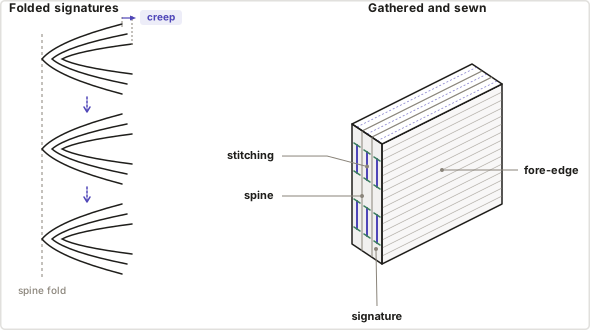
A longfic also picks up two problems a oneshot never meets. The first is creep: nest sheets inside each other and the paper's own thickness pushes the inner pages out past the outer ones at the open edge, so trimming the book flush eats the outer margins of the innermost pages. In Expert Layout, give Folio your paper thickness and it nudges each page back toward the spine to cancel the push. The second is page numbers. Imposition rotates and rearranges pages, so numbers the PDF already carries can land in the gutter (the inner margin that disappears into the binding) or upside-down on the back of a sheet. Folio detects the old numbers, removes them, and stamps fresh ones that read correctly after folding. Page numbering in bookbinding shows how. Whichever path you take, give the text a binding margin so the words don't drown in the fold.
How do I print fanfiction as a physical book?
Fanfiction becomes a physical book the same way any PDF does. Impose the file into folded sections, print the sheets double-sided at actual size, fold each one in half, and stack the sections in order. A oneshot takes two staples through the fold. A longfic gets sewn through the marked stations and cased into a cover.
Printing has two rules of its own: print at actual size, never fit-to-page, and check your printer's front-to-back alignment before committing the whole fic. A "fit to page" setting shrinks every sheet a few percent, which pulls the fronts out of register with the backs so the fold stops splitting the spreads cleanly. Calibration & Printing covers both rules, including the calibration sheet you print once and measure with a ruler.
After that it's craft: fold, sew, shelve. Start your longfic in Folio's Guided Binder, or lay out a oneshot in Print & Fold if one folded section covers it. Once the block is sewn, measure its thickness and the Binding Planner Schematic gives you the board, spine inlay and cloth sizes for the case.